Follow the steps below to enable the AirPlay (legacy) functionality on you Beolit 12:
-
 1
1
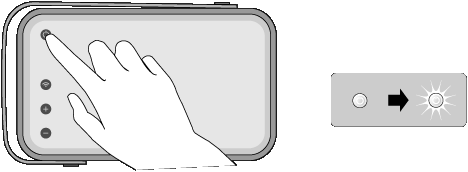
Switch on your Beolit 12
- On Beolit 12, press the On/Off button shortly. Then wait for the On/Off button to become solid white.
- If your Beolit 12 is not connected to your wi-fi network, please click here for first-time setup steps.
-
2
Play your music
- Make sure your iOS device is connected to the same network (router) as Beolit 12.
- Launch your music application. Select Beolit 12 from the AirPlay list.
Enjoy!

